Turn your business knowledge into 24/7 customer support.
Pingie answers your website visitors in seconds, using only your documents, web pages and team answers. Every answer shows its source. When Pingie doesn't know, it says so and brings in your team.
Every answer shows its source. Unknown questions get an honest reply.
Pingie writes each answer from the passages it found in your content and lists them underneath. If nothing relevant is found, it doesn't improvise: it says so and offers the next step.
Source chips under every answer, linked for web pages
Says “I don't know” when your content doesn't cover it
Offers a person, or asks for an email when nobody is online
Choose how careful it is: Strict, Balanced or Helpful
Why it matters: Customers can trust what they read, and you never have to clean up after an invented answer.
Acme SupportTypically replies instantly
How long does delivery take?
Standard delivery takes 3–5 business days within the country.shipping-policy.pdf
Do you ship to Iceland?
I don't have that information. Would you like to talk to someone from the team?Talk to a person
Ask a question…
Powered by Pingie
Human handoff · Conversation management
Your team is one click away
Every chat lands in one inbox. When a visitor asks for a person, available teammates get an alert, join the same chat, and hand it back to the bot when they're done.
Browser alerts and a waiting count when a visitor asks for a person
Filter by Live, Unanswered, Disliked and Handoffs
Take over any chat, reply live, then hand back to the bot
Live chat only during the business hours you set
Why it matters: Customers who need a person reach one quickly, and nothing falls through the cracks.
AllLiveUnansweredDisliked
Visitor #4821nowDo you ship to Iceland?Waiting
maya@northwind.io2mRefund on an annual planAnswered
Visitor #481714mBulk pricing for 200 seatsUnanswered
li@brightpath.co1hChange billing emailAnswered
Visitor #4821Join chatSave as knowledge
Do you ship to Iceland?
I don't have that information yet. Would you like to talk to a person?
Visitor asked for a person · waiting
Reply to the visitor…
Website chat widget
One small script, ready-made snippets for HTML, React, Next.js and WordPress, your colours and welcome message.
Support lives where your customers already are.
Lead capture
When a question isn't covered and nobody is online, Pingie asks for an email and sends it to you with the question.
Missed questions turn into follow-ups, not lost sales.
Workspaces and team roles
Invite teammates as editors or viewers, run several bots, or share a single bot with a client.
Everyone gets the access they need, and no more.
Insights that show what to fix
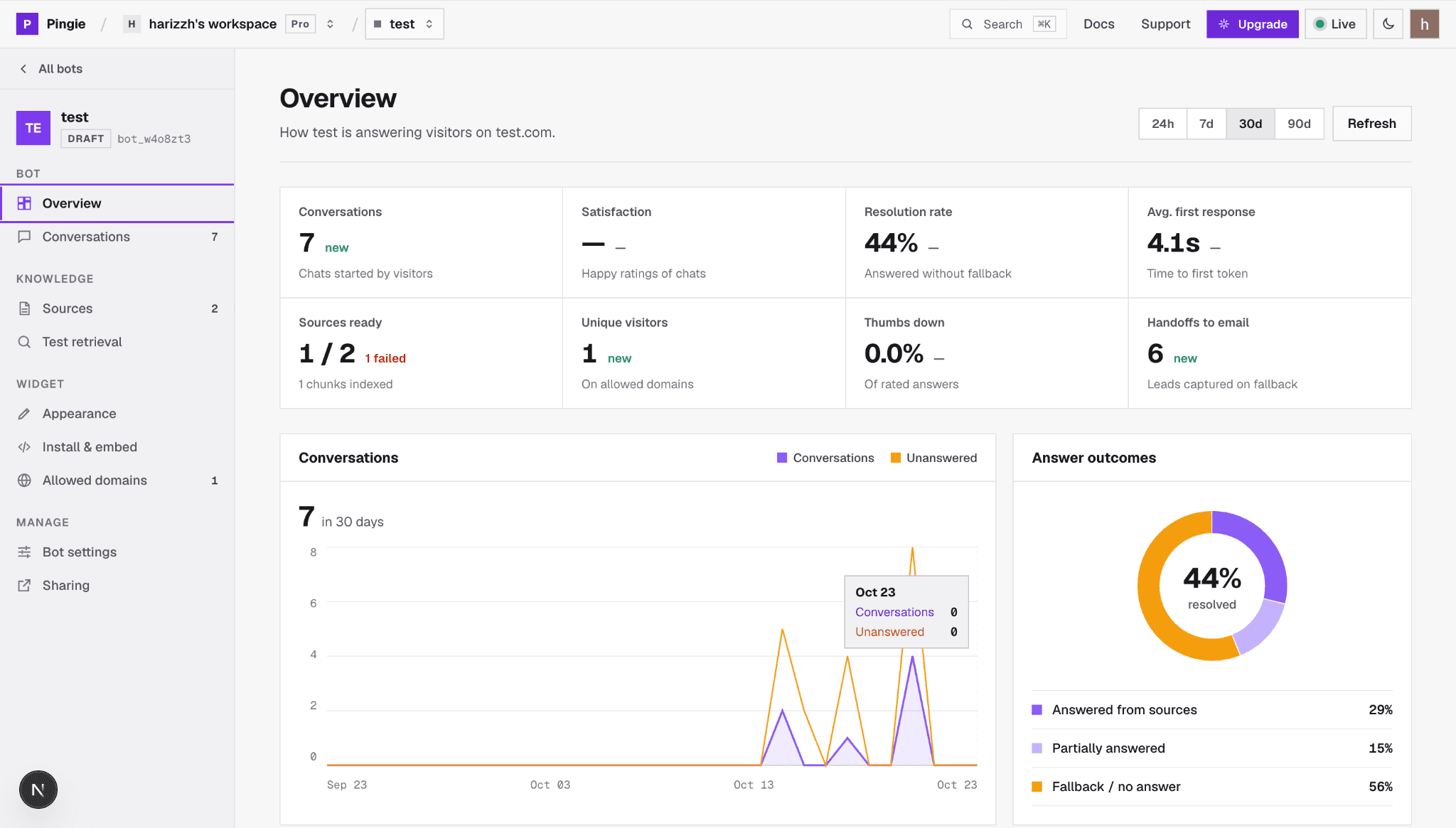
Resolution rate, first response time, handoffs, and which answers came from your sources.
You always know what to add next.
How it works
Live on your website in four steps
No developers, no training data to prepare. If you have documents or a website, you have everything Pingie needs.
01Step 1
Create your bot
Sign in with Google. Your workspace is created on the first sign-in, and a short wizard sets up your first bot.
No credit card
Start on the free plan
PPingieSign inThe first sign-in creates your workspace.Continue with Google
02Step 2
Add your business knowledge
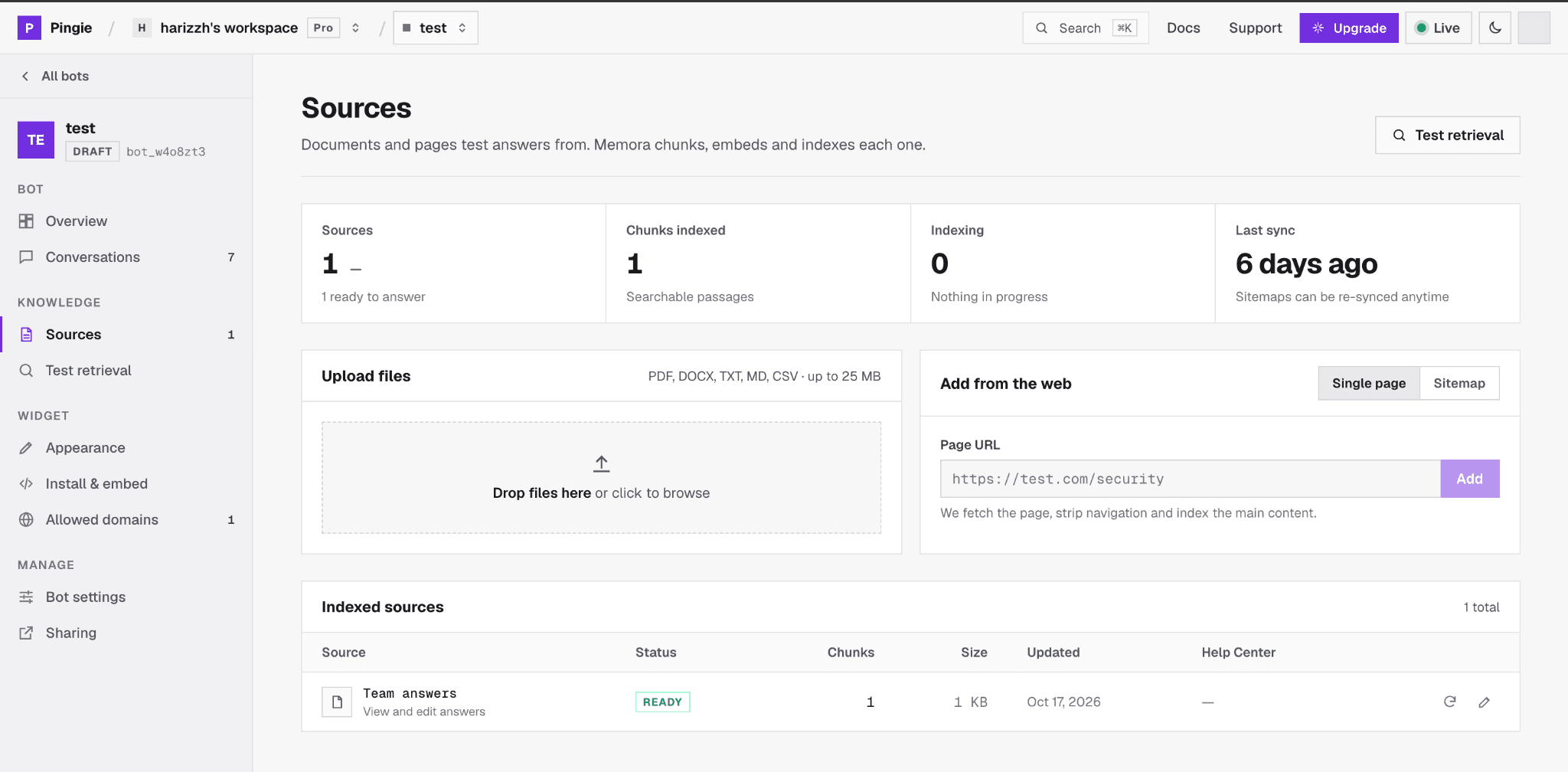
Upload documents, add pages from your website, or write answers yourself. Then ask a test question to see exactly what the bot finds.
PDF, DOCX, TXT, MD, CSV up to 25 MB
Single pages or a whole sitemap
Knowledge · Sources
03Step 3
Customize and embed
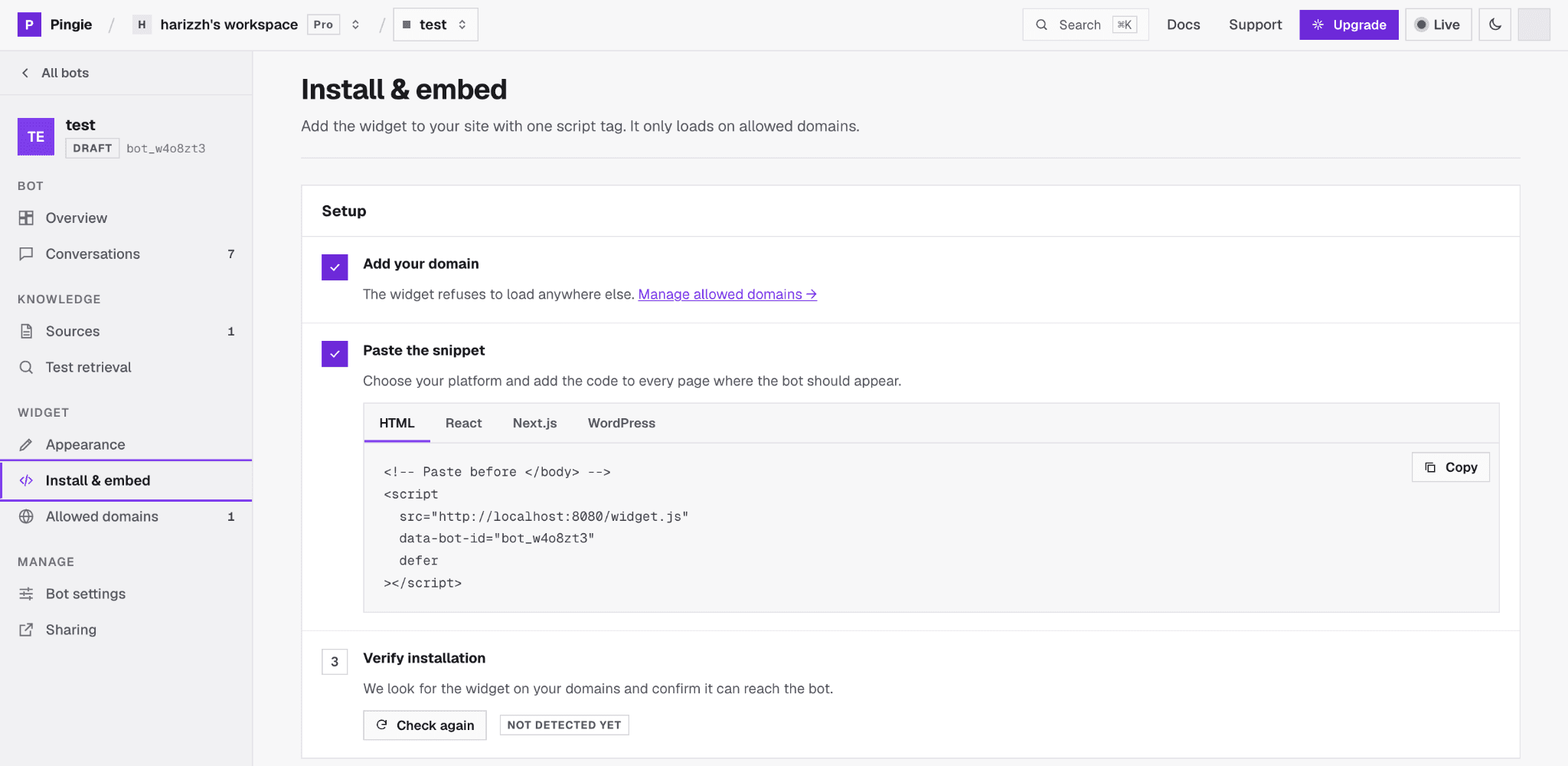
Pick colours, a welcome message and suggested questions, then paste one script tag on your site. It only loads on domains you allow.
Snippets for HTML, React, Next.js, WordPress
Live preview while you design
Widget · Install & embed
04Step 4
Let Pingie help your customers
Switch the bot to Live. Review conversations, step into any chat, and save better answers so the bot keeps improving.
Customers wait hours, or until Monday, for a reply
Answers live in PDFs, pages and people's heads
After-hours questions disappear unanswered
Generic bots guess when they don't know
PWith Pingie
Repeat questions are answered for you
Customers get an answer in seconds
Your knowledge is searchable in one place
Unanswered questions become leads or handoffs
Every answer shows its source, or Pingie says it doesn't know
How much changes depends on how much of your support your content already covers.
Who it's for
Made for teams that answer the same questions every day
Pingie works best when the answers already exist somewhere: in documents, on your website, or in your team's heads.
SaaS companies
“How do I connect my account?”
Train Pingie on your docs and help pages so users get setup answers inside your product site, and hand billing questions to your team.
E-commerce stores
“Do you ship to my city, and how do returns work?”
Shipping, returns and sizing answers from your policy pages, with an email captured when a question isn't covered.
Agencies
“Can you set up support for our client?”
Run a separate bot for each client and share a bot with the client as a viewer or editor.
Service businesses
“What are your hours, and what does it cost?”
Services, prices and booking steps answered at any hour. Live chat only during the business hours you set.
Small teams
“We can't hire a support person yet.”
Let Pingie handle the routine questions and get alerted only when a customer needs a person. Start on the free plan.
Busy support teams
“Our inbox is full of the same ten questions.”
Let the bot take the repeat questions, filter the inbox to what's unanswered or disliked, and take over any chat.
See it in action
Five support moments, handled
Example conversations showing how Pingie behaves, from adding knowledge to learning from a missed question.
A business adds its knowledge
Drop in a refund policy, point Pingie at your sitemap, and add a few answers in your own words. Each source shows when it's indexed and ready.
Indexing progress shown for every source
Re-sync a page after you change it
Drop files here · PDF, DOCX, TXT, MD, CSV
refund-policy.pdfPDF · 6 pagesReady
acme.com/sitemap.xmlSitemap · 48 pagesReady
Team answers12 answersReady
shipping-rates.csvCSV · 18 KBIndexing
A customer asks, Pingie answers from your content
The answer streams in word by word, written from your refund policy, with the document shown underneath so the customer knows where it came from.
Answers from your sources only
Source shown under the answer
Acme SupportTypically replies instantly
Can I get a refund on an annual plan?
Yes. Annual plans can be refunded within 30 days of purchase.refund-policy.pdf
Thanks!
You're welcome! Anything else I can help with?
Ask a question…
Powered by Pingie
When it doesn't know, it says so
Nothing in your content covers shipping to Iceland, so Pingie doesn't guess. Nobody is online, so it asks for the visitor's email and sends you the question as a lead.
No invented answers
Lead saved with the question and emailed to you
Acme SupportTypically replies instantly
Do you ship to Iceland?
I don't have that information yet. Leave your email and the team will get back to you.
you@company.comSend
Ask a question…
Powered by Pingie
A person takes over in the same chat
When a teammate is available, the visitor can ask for a person. The teammate gets an alert, joins the conversation, and the bot stays quiet until they hand it back.
Alerts for every available teammate
Hand back to the bot when done
Acme SupportMaya from the team
Can I talk to someone about bulk pricing?
Maya from the team joined the chat
Maya · TeamHi! Happy to help. How many seats are you planning for?
Ask a question…
Powered by Pingie
Missed once, answered from then on
From the unanswered chat, a teammate writes the right answer and saves it. Pingie adds it to its knowledge and uses it the next time anyone asks.
Save the answer straight from the conversation
Optionally send it to the visitor right away
Save as knowledge
QuestionDo you ship to Iceland?AnswerYes. We ship to Iceland in 5–8 business days. Shipping is free on orders over $80.Also send this answer to the visitor nowSave answer
Trust and control
Built so you stay in control of every answer
You decide what Pingie knows, where it runs and who on your team can change it.
Answers only from your sources
Pingie searches your content for every question. If nothing relevant is found, it says it doesn't know instead of guessing.
You set how careful it is
Choose Strict, Balanced or Helpful. Strict answers only when your content clearly covers the question.
Runs only on your domains
The widget checks every request against your allowed domains, so nobody else can embed your bot.
Each visitor's chat stays private
Every conversation gets its own signed token, so one visitor can't read another's chat.
Roles for your team
Owners, editors and viewers. Viewers can read everything but change nothing, and only owners can delete.
Your knowledge, under your control
Delete a source and it is removed from search straight away. Owners can clear a bot's chat history at any time.
Pingie is an AI customer support chatbot for your website. You train it on your own documents, web pages and written answers, add it to your site with one script tag, and it answers visitors' questions instantly. When it doesn't know an answer, it says so and brings in your team.
How does the Pingie AI chatbot work?
When a visitor asks a question, Pingie searches the knowledge you added, keeps only the passages that are clearly relevant, and writes an answer from them with the sources shown underneath. If nothing relevant is found, it replies that it doesn't know and offers a person or asks for the visitor's email.
How do I train Pingie with my business knowledge?
Upload PDF, DOCX, TXT, MD or CSV files up to 25 MB each, add a single web page or a whole sitemap, or write answers yourself. When the bot misses a question, you can save the right answer from the conversation and Pingie uses it from then on.
Can I add Pingie to my existing website?
Yes. Paste one script tag before the closing body tag. The dashboard has ready-made snippets for HTML, React, Next.js and WordPress. The widget loads in its own isolated container, so it won't clash with your site's styles, and it only runs on the domains you allow.
What happens when Pingie can't answer a question?
It says it doesn't have that information instead of making something up. If someone on your team is available, the visitor can ask to talk to a person. Otherwise Pingie asks for their email and sends the question to you as a lead. The question also shows up as unanswered in your inbox, so you can add the answer.
Can Pingie transfer conversations to human support?
Yes. Teammates who mark themselves available get a browser alert when a visitor asks for a person. The first to join takes over, and the bot stays quiet until they hand the chat back. If nobody joins within two minutes, Pingie asks the visitor for their email.
Can I manage multiple chatbots?
Yes. Each bot has its own knowledge, settings, appearance and allowed domains, and you switch between them from the dashboard. The free plan includes three bots, and paid plans include more.
Can my team work in Pingie together?
Yes. Invite teammates to your workspace as editors or viewers, or share a single bot with someone outside it. Editors can change bots and reply in live chat; viewers can read but not change anything.
Do I need technical knowledge to set up Pingie?
No. You sign in with Google, upload files or paste page addresses, and copy one snippet into your site. If you can add a line of code to your website or ask whoever manages it, you can install Pingie.
How does Pingie help reduce customer support workload?
Pingie answers the questions your content already covers, so your team doesn't have to. Questions it can't answer go to a person or become email leads, and every missed question can be turned into a saved answer. How much it helps depends on how much of your support is covered by your content.
Which languages does Pingie reply in?
Each bot can reply in English, Hindi or Tamil, or match the language the visitor writes in.
Is there a free plan?
Yes. Sign in with Google to start on the free plan. No credit card is needed. When you need more bots, messages or teammates, compare plans in the dashboard and contact the Pingie team to upgrade.
Your customers have questions. Give them answers without adding work to your team.
Train Pingie on what you already know, add it to your site, and let your team focus on the conversations that need them.